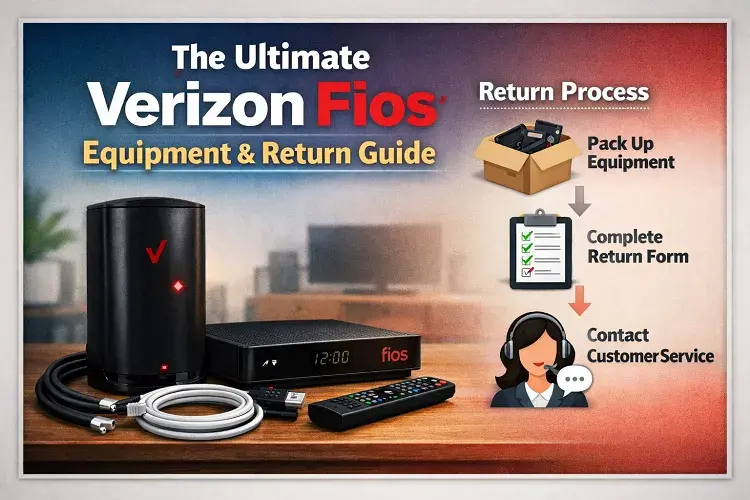
Where to return Verizon Fios equipment near me? If you have canceled your Verizon Fios service, you have 30 days to return your leased equipment to avoid unreturned equipment charges (up to $175 per device). You can return your Verizon Fios router, set-top boxes, and remotes for free at any official The UPS Store location. You do not need a box or a shipping label; simply bring the equipment and your Verizon account number, and UPS will pack and ship it back to Verizon at no cost to you.
Note: Do not attempt to remove or return the white ONT box attached to your wall; it stays with the house.
The Ultimate Verizon Fios Equipment Guide: Routers, Modems, & Returns
When you sign up for a high-speed fiber-optic internet plan, the hardware you use is just as important as the speed you pay for. Even if you are paying for Gigabit internet, using an outdated Verizon Fios router or struggling with poor equipment placement can cripple your Wi-Fi speeds.
In this comprehensive guide, we are breaking down everything you need to know about your Verizon Fios equipment. We will explain the crucial difference between your router and your modem (ONT), how to optimize your home Wi-Fi, and exactly how to return your equipment if you are moving or switching providers.
1. Understanding Your Verizon Fios Equipment
Unlike traditional cable internet providers that use a standard “modem/router combo,” a 100% fiber-optic network like Verizon Fios uses a slightly different setup. There are two main pieces of equipment you need to understand:
The Verizon Fios ONT (Optical Network Terminal)
Many people search for a Verizon Fios modem, but technically, Fios doesn’t use a modem. Instead, they use an ONT (Optical Network Terminal).
When the fiber-optic cable from the street reaches your home, it plugs directly into the ONT box (usually a white or gray box mounted on the wall in your garage, basement, or utility closet). The ONT’s job is to translate the light signals coming through the fiber-optic cable into electrical signals that your router can understand.
Crucial Rule: The ONT is permanently tied to the property. If you ever move or cancel your service, do not take the ONT box with you. It belongs to the house!
The Verizon Fios Router
The Verizon Fios router is the device that takes the internet signal from the ONT and broadcasts it throughout your home as a Wi-Fi signal.
Currently, Verizon provides the Fios Router (CR1000A or CR1000B), which is a highly advanced piece of hardware supporting Wi-Fi 6E. This means it can handle multi-gigabit speeds and dozens of connected devices without slowing down.
If you live in a larger home or a multi-story house and struggle with “dead zones” where the Wi-Fi drops, you can also rent Fios Extenders. These pair seamlessly with Verizon Fios routers to push the signal through thick walls and floors.
2. Using Your Own Router vs. Renting
One of the most common questions we get is: Can I use my own router with Verizon Fios?
Yes, you can! Because the ONT box translates the signal into standard Ethernet, you can plug almost any modern, third-party router directly into the ONT.
However, with Verizon’s current pricing structure, the rental fee for the official Fios Router is often included for free with their higher-tier plans (like the 1 Gig or 2 Gig plans). If the rental is free, we highly recommend using their official equipment because it guarantees that Verizon tech support can troubleshoot your network remotely if your speeds drop.
3. Canceling Service? Where to Return Verizon Fios Equipment
If you are searching for “where to return Verizon Fios equipment near me,” there is a very high probability that you are either moving to a new home or you are tired of your current bill and have decided to cancel your service.
🛑 STOP: Before You Cancel, Read This
If you are canceling Verizon Fios because your bill went up, do not leave yourself without internet!
When you cancel a provider, you lose all your leverage. Before you officially disconnect your Fios service, you need to lock in a “New Customer Promotional Rate” with a competitor. Cable and Fiber providers are currently engaged in a massive price war, and you can secure incredibly cheap internet by switching today.
Check these limited-time deals in your area before you return your Verizon equipment:
- 👉 Check AT&T Fiber Availability & Pricing
- 👉 Check Spectrum Internet Deals in Your Zip Code
- 👉 See Xfinity Promotional Pricing
By securing a new provider first, you ensure zero downtime for your home network, and you can often get the new provider to pay your switching costs!
How to Return Your Hardware
If you have already secured your new internet provider and are ready to return your Verizon Fios equipment, the process is actually very simple.
Remember, you must return all leased equipment within 30 days of canceling your service. If you fail to return the hardware, Verizon will charge your credit card an “Unreturned Equipment Fee,” which can range from 50foraset−topboxto175 for the router.
Here is the step-by-step return process:
- Unplug the Devices: Gather your Verizon Fios router, any Wi-Fi extenders, TV set-top boxes, and remotes. Be sure to grab the power cords as well.
- Leave the ONT: As mentioned above, leave the white or gray ONT box firmly attached to the wall. Do not remove it.
- Go to The UPS Store: You do not need to hunt down a cardboard box or print a shipping label. Simply take your unboxed equipment to any official The UPS Store location.
- Scan and Ship: Tell the UPS associate you are returning Verizon equipment. You will need to provide them with your Verizon Account Number (which you can find on your final bill or in the My Fios app). UPS will scan the equipment, pack it in a custom box, and ship it back to Verizon for free.
- Keep Your Receipt: This is the most important step! UPS will give you a tracking receipt. Keep this piece of paper in a safe place. If Verizon’s warehouse ever claims they didn’t receive your router, this tracking number is your legal proof that you returned it on time, preventing you from paying a $175 fee.
Final Thoughts on Verizon Fios Wi-Fi
The Verizon Fios equipment ecosystem is generally considered one of the best in the telecom industry. Because the signal travels over pure glass fiber-optics rather than old copper wiring, the hardware is able to deliver incredibly low ping and symmetrical upload and download speeds.
Whether you are upgrading to their newest Wi-Fi 6E router or packing up your equipment to switch to a competitor, understanding your hardware is the first step to mastering your home network.
Need to check availability for a new provider? Use our free comparison tool below to instantly see which ISPs offer the fastest speeds at your address!
More ISP Troubleshooting Guides
Fix Connection Errors: Is your network suddenly dropping? Find out exactly Why Your Internet Slows Down at Night, or troubleshoot hardware failures with our guide to fixing an AT&T Router Blinking Red.
Manage Your ISP Account: Do not get hit with hidden fees. Learn how to avoid the Cox Data Cap, and if you are switching providers, make sure you read our Ultimate Verizon Fios Equipment Return Guide to avoid massive unreturned equipment charges.
Updated on: August 1, 2026