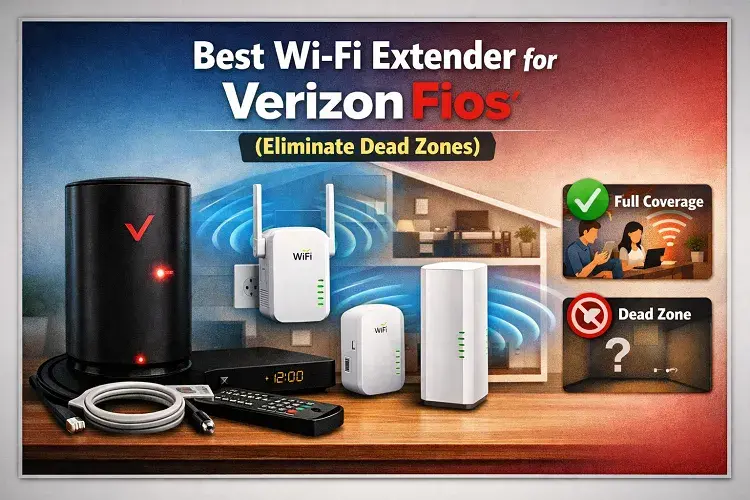
What is the best Wi-Fi extender for Verizon Fios? The best Wi-Fi extender for Verizon Fios is the official Verizon Fios Extender (E3200) because it pairs seamlessly with the Fios Router (CR1000A/B) to create a unified mesh network without requiring a separate network name (SSID).
However, if you are looking for a more affordable third-party alternative, mesh systems like the TP-Link Deco or Amazon eero are highly compatible with Verizon Fios. Before buying an extender, check your current Verizon account; customers on the Fios 1 Gig or 2 Gig plans often receive the official Verizon Extender rental included for free!
Best Wi-Fi Extender for Verizon Fios (Eliminate “Dead Zones” Forever)
You are paying for lightning-fast fiber-optic internet. When you are sitting in the living room next to your Verizon Fios router, your speeds are incredible. But the moment you walk upstairs to your bedroom or step out onto the back patio, the Wi-Fi signal drops to a single bar, videos start buffering, and web pages refuse to load.
You have just walked into a Wi-Fi Dead Zone.
Dead zones are the #1 complaint among high-speed internet customers. Fortunately, the solution is simple, and in many cases, it might not even cost you a dime.
In this guide, we are breaking down the exact science of why your Verizon Wi-Fi is struggling to reach certain rooms, and we will reveal the absolute best Verizon Fios extenders to blanket your entire property in a flawless, high-speed connection.
Why Is My Verizon Fios Wi-Fi So Weak Upstairs?
Before you buy new equipment, you need to understand why your internet is failing. It is rarely Verizon’s fault; the problem is usually basic physics.
Modern Verizon Fios routers broadcast incredibly fast Wi-Fi using the 5GHz and 6GHz bands. These high-frequency bands are capable of pushing Gigabit speeds through the air, but they have one massive weakness: They cannot easily penetrate solid objects.
Every time your Wi-Fi signal has to pass through a brick wall, a metal HVAC duct, a glass mirror, or a thick ceiling floorboard, the signal degrades drastically.
If your Verizon router is located in the basement, but your home office is on the second floor, the 5GHz signal simply doesn’t have the physical strength to punch through two layers of flooring to reach your laptop.
To fix this, you need a device that catches the Wi-Fi signal while it is still strong and rebroadcasts it into the dead zone. You need a Wi-Fi Extender.
Option 1: The Official Verizon Fios Extender (Recommended)
If you are currently using the modern, white, rectangular Verizon Fios Router (model CR1000A or CR1000B), the absolute best range extender for your home is the official Verizon Fios Extender (E3200).
Why It’s the Best Option:
- Seamless Mesh Technology: Unlike cheap, plug-in extenders that create a new, annoying network name (like MyWiFi_EXT), the official Verizon extender syncs flawlessly with your main router. Your phone or laptop will automatically switch to the strongest signal as you walk around the house without dropping your connection.
- MoCA Support: If you have coaxial cable outlets in your walls, you can plug the Verizon extender directly into the coax jack. This allows the extender to receive a pure, wired Gig-speed connection from the main router, which it then broadcasts via Wi-Fi to your dead zone.
🛑 STOP: Don’t Buy It Before Checking Your Plan!
The official Verizon Extender normally costs hundreds of dollars to buy, or comes with a monthly rental fee.
However, Verizon is currently engaged in a massive promotion. If you upgrade your service to the Fios 1 Gig or Fios 2 Gig plan, Verizon often includes the official Fios Extender rental for FREE.
Instead of spending your own money on a third-party extender, it is almost always smarter to upgrade your Verizon plan. You get significantly faster base speeds, and they will ship the premium extender to you at no extra cost.
👉 [Button/Link: Check Verizon Fios Gigabit Upgrades & Free Extender Offers Here] (Insert CJ Affiliate Link)
Option 2: The Best Third-Party Extenders (Amazon)
If you are on a strict budget, or if you refuse to rent equipment from your ISP, you can easily use third-party Wi-Fi extenders with your Verizon Fios connection.
Because the Fios ONT (the box on your wall) provides a standard Ethernet connection, it is highly compatible with retail networking gear. If you are going to buy your own equipment, we highly recommend upgrading to a Mesh Wi-Fi System rather than a cheap, single-plug extender.
Here are the top-rated systems on Amazon that pair beautifully with Verizon Fios:
1. TP-Link Deco AX3000 WiFi 6 Mesh System
This is our top budget pick. The TP-Link Deco system replaces your single router with two or three “nodes” that you place around your house. They communicate with each other to create a massive, unified blanket of Wi-Fi 6 coverage. It can easily handle speeds up to 1 Gig and eliminate dead zones in homes up to 6,500 square feet.
🛒 [Check Current Price on Amazon] https://www.amazon.in/TP-Link-Deco-X50-PoE-Multi-Gig-Compatible/dp/B0BNKKLYYY
2. Amazon eero Pro 6E Mesh Wi-Fi System
If you want the absolute cutting edge of wireless technology, the eero Pro 6E is a monster. It utilizes the brand new 6GHz band (Wi-Fi 6E), which acts like a VIP fast lane for your newest smartphones and laptops. If you are paying for Verizon’s 2 Gig plan, the eero Pro 6E is one of the only systems capable of distributing those speeds wirelessly without bottlenecks.
🛒 [Check Current Price on Amazon]: https://www.amazon.com/Amazon-eero-Wi-Fi-router-newest/dp/B091G65HH6
The Ultimate Fix: Hardwiring
While Wi-Fi extenders and Mesh systems are incredible pieces of technology, there is one undeniable truth in the networking world: Nothing beats a wire.
If you have a desktop computer, a PlayStation 5, or a Smart TV that is constantly buffering, the absolute best solution is to run a physical Ethernet cable directly from your Verizon Fios router to the device. A direct wire guarantees 100% of the speed with zero interference from walls or neighboring Wi-Fi networks.
Ready to Upgrade Your Speeds?
If you have tried extenders and your internet is still crawling, it might be time to ditch your current provider entirely. Use our free tool below to compare the fastest fiber-optic internet deals currently available at your exact address!
More Home Networking & Hardware Guides
Upgrade Your Equipment: Are you still renting an outdated modem from your ISP? Learn the crucial differences between DOCSIS 3.0 and 3.1 in our Modem Guide to ensure you are getting the speeds you pay for.
Eliminate Dead Zones: If your WiFi drops in the bedroom or garage, read our breakdown of WiFi Extenders vs. Repeaters vs. Mesh Systems. If you are a Verizon customer, check out our top picks for the Best WiFi Extender for Verizon Fios.
Updated on: August 1, 2026