Fiber internet is the gold standard for home connectivity in 2026, delivering symmetrical multi-gigabit speeds, ultra-low latency, and rock-solid reliability that cable and DSL simply can’t match. But many homeowners still wonder: How exactly is fiber internet installed?
The good news? The process is smoother and less invasive than most people expect. Whether you’re upgrading from slow DSL or moving into a new home, a professional technician handles 95% of the work. In this complete guide, we’ll walk you through every stage of fiber optic internet installation, what to prepare for, how long it takes, and what top U.S. providers do differently. By the end, you’ll know exactly what to expect on installation day.
Why Fiber Installation Matters in 2026?
Unlike older copper-based internet, fiber uses hair-thin strands of glass that transmit data at the speed of light using light pulses. This means no signal degradation over distance and future-proof performance up to 8 Gbps or more. Installation is a one-time investment that brings blazing-fast, symmetrical upload/download speeds—perfect for 4K/8K streaming, remote work, online gaming, and smart homes.
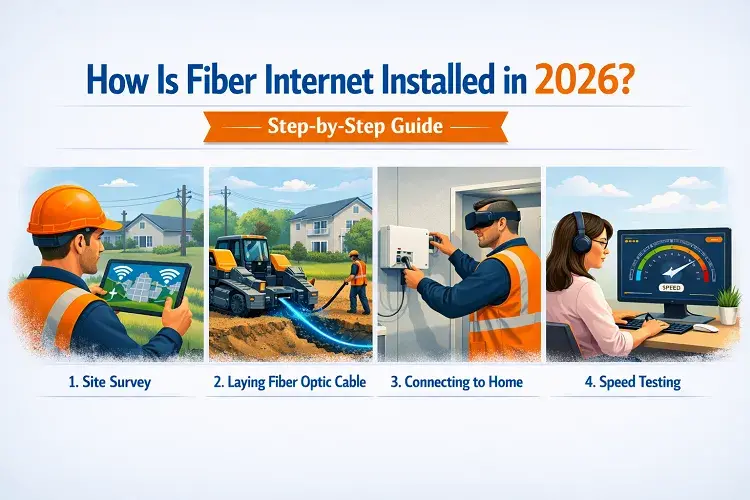
The Step-by-Step Fiber Internet Installation Process
Here’s exactly what happens from the moment you order service until you’re streaming in ultra-HD.
1. Availability Check & Order Placement (1–3 days) You enter your address on the provider’s website. If fiber is available, you choose a plan and schedule installation. Some fiber internet providers offer self-install kits; most require a professional visit.
2. Site Survey & Utility Marking (1–7 days before install) A technician or crew visits (sometimes virtually) to map the best route from the nearest fiber node or utility pole to your home. They’ll call 811 to mark underground utilities (gas, water, electric) with colorful flags and paint. This step prevents accidental damage and usually takes 30–60 minutes.
3. Running the Fiber “Drop” Cable (The Main Work) This is the core of the installation. There are two main methods:
- Aerial: Fiber is strung along existing utility poles (fastest and least disruptive).
- Underground/Bore: A small trench or directional bore (2–4 inches wide) is dug from the street or pedestal to your house. The fiber cable is buried 12–18 inches deep.
The “drop” cable (a tough, weatherproof fiber line) runs to a small box called a Network Interface Device (NID) or Optical Network Terminal (ONT) mounted on the outside wall of your home. Total time: 2–6 hours, depending on distance and method.
4. Installing the ONT (Optical Network Terminal). The ONT converts light signals from the fiber into electrical signals your devices understand.
- Outdoor ONT: Mounted on the exterior wall (common in newer builds).
- Indoor ONT: Placed inside near an electrical outlet (preferred for protection).
The technician runs a short indoor fiber or Ethernet cable from the ONT to your Wi-Fi gateway/router. Modern ONTs are compact (about the size of a small book) and include battery backup in many cases.
5. Connecting & Activating Your Router/Gateway The technician installs or activates the provider’s Wi-Fi gateway, sets up your network name and password, and connects your devices. They’ll run speed tests to confirm you’re getting the full promised speeds (e.g., 1 Gbps down/up).
6. Final Cleanup & Burying (Optional follow-up) Exposed drop cable is usually buried within 7–14 days (weather permitting). The crew restores landscaping and removes any temporary markers.
Total Time on Installation Day: 3–6 hours for most homes. Someone 18+ must be present. Typical Cost: Professional installation is often free or $99 with a 1–2 year contract. Trenching in difficult terrain may add $200–$1,000 (many providers waive this).
Pro Tip: Clear a path to your electrical panel and preferred ONT location. Move furniture away from baseboards if indoor routing is needed.
Top 5 Fiber Internet Providers in the USA & Their Installation Processes (2026)
Here are the leading fiber providers and what makes their installation unique:
1. AT&T Fiber: AT&T has the widest fiber footprint in the U.S. A technician arrives for a 4–6 hour pro install. They run the fiber drop, install the Wi-Fi gateway, and handle any interior wiring. The burial of the drop cable usually occurs within days of the main visit. AT&T often provides a new gateway and emphasizes seamless Wi-Fi 6E setup.
2. Verizon Fios Verizon offers strong East Coast coverage. Many customers qualify for self-install kits (equipment mailed), but full pro installs take 4–6 hours. The technician installs the ONT and router, often using existing coax lines where possible for faster setup. Verizon is known for minimal disruption and excellent customer service.
3. Google Fiber (GFiber) Google Fiber stands out for speed and simplicity. The process includes utility marking, on-property prep (trenching if needed), and a focused in-home install. Their crews are highly efficient, and the entire process is designed for minimal hassle. GFiber often includes multi-gig plans with symmetrical speeds up to 8 Gbps.
4. Frontier Fiber Frontier offers both professional and self-install options in many areas. Techs locate or install the ONT, connect it to the network box via Ethernet, and power everything up. Self-install kits are shipped for eligible homes, making it one of the fastest “no-wait” options. Installation is typically quick once the fiber drop is in place.
5. Quantum Fiber (by Lumen/CenturyLink) Quantum uses a two-stage process: first, the fiber line is run to the property (pre-install), then a technician installs the SmartNID device inside (about 3 hours total). They focus on clean, professional wiring and often serve areas where other providers are expanding slowly.
All major providers now use similar modern equipment, so the result—symmetrical gigabit+ speeds—is nearly identical. The biggest differences are availability in your ZIP code and any promotional installation fees.
Conclusion
Fiber internet installation in 2026 is a straightforward, professional process designed to get you online with minimal hassle. From the initial utility marking to the final speed test, providers handle the heavy lifting so you can enjoy symmetrical multi-gig speeds the same day.
Ready to upgrade? Enter your address on your favorite provider’s site (AT&T, Verizon, Google Fiber, or Frontier) and see what’s available in your neighborhood today. The future of the internet is fiber—and it’s easier to get than ever.
Frequently Asked Questions About Fiber Installation
1. How long does fiber internet installation take?
Most professional installs take 3–6 hours on the scheduled day. The full process (from activation order) can take 1–3 weeks, depending on scheduling and any required trenching.
2. Is fiber installation free?
Yes, in most cases with a service agreement. Some providers charge $99 or waive the fee during promotions. Extra trenching or complex routing may incur a one-time fee.
3. Do I need to be home during installation?
Yes—someone 18 or older must be present for the entire visit. Technicians need access to both inside and outside your home.
4. Can I get fiber if I rent an apartment or house?
Absolutely. Landlords usually approve fiber installs because they add property value. You may need written permission; providers handle permits.
5. What if my yard has landscaping or a driveway?
Directional boring (small underground tunnel) minimizes disruption. Crews are trained to work around gardens, patios, and driveways.
6. Will installation damage my walls or property?
Technicians use existing holes or drill small, neatly sealed openings. Most homes require zero or minimal wall work.
7. How soon after installation can I use the internet?
Immediately after the technician leaves, connect your devices. Full speeds are usually available right away.
8. What’s the difference between fiber and cable installation?
Fiber requires running new glass cables and an ONT; cable reuses coaxial lines and is usually quicker but offers lower symmetrical speeds.