When searching for internet service at your address, the process can feel overwhelming with countless options, varying speeds, and pricing structures. This comprehensive 2,500+ word guide walks you through every step of finding, comparing, and purchasing internet service—whether you prefer the convenience of phone ordering or exploring comparison platforms like CompareInternetHub.
Understanding Why Internet Provider Selection Matters
The internet has become as essential as electricity and water. Your choice of internet provider directly impacts productivity, entertainment quality, and overall household satisfaction. Unlike utilities where you might have limited choices, most American households now have access to two or more providers at competitive speeds, creating genuine competitive pressure that benefits consumers. Understanding how to navigate these options ensures you’re not overpaying or settling for substandard service.
The Current Internet Provider Landscape in the USA
Market Leaders and Their Reach
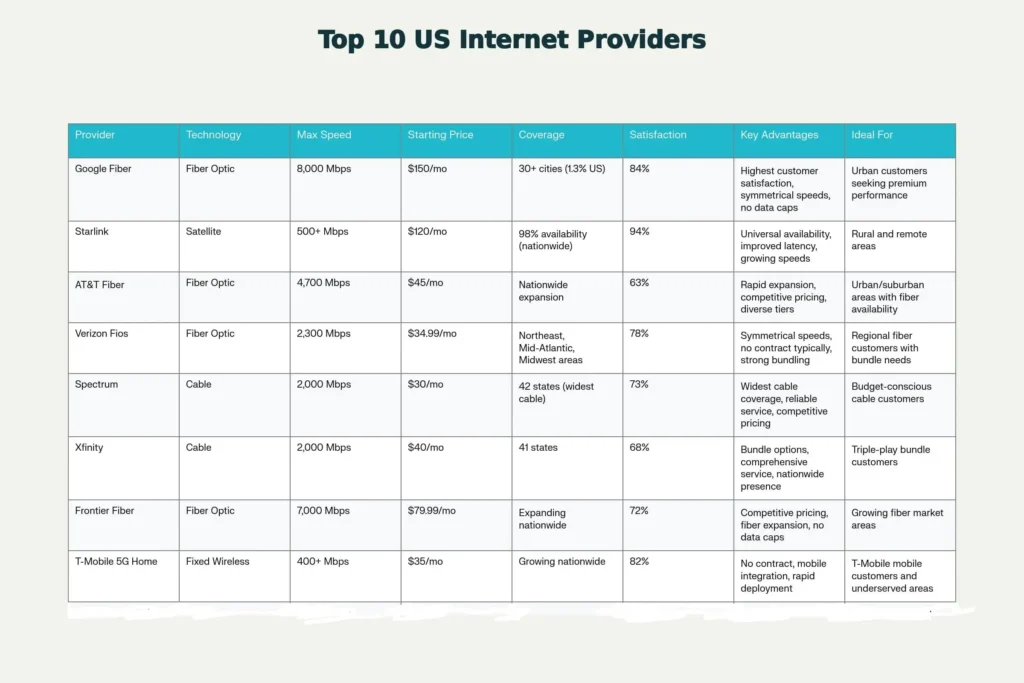
The broadband market in the United States shows clear concentration among major players, though regional alternatives continue gaining prominence.
AT&T commands approximately 22% market share, leveraging extensive fiber deployment across numerous markets alongside traditional DSL infrastructure. AT&T Fiber service has expanded significantly, offering speeds up to 4,700 Mbps on premium tiers while maintaining competitive pricing. For areas without fiber, AT&T’s 5G Home Internet provides an alternative solution.
Spectrum (operated by Charter Communications) holds the second position with 20% market share and serves 42 states. Known for strong availability and reliable performance, Spectrum offers plans ranging from 300 Mbps up to 2,000 Mbps gigabit speeds. The provider maintains competitive pricing with plans starting at $30 per month and generally receives positive customer feedback for service reliability.
Xfinity (Comcast) commands 19% market share and dominates many urban and suburban areas across 41 states. With extensive network infrastructure and plans reaching up to 2,000 Mbps, Xfinity serves millions of American households. The provider frequently offers promotional pricing for new customers while maintaining competitive speeds and bundling options.
Google Fiber stands out for customer satisfaction despite serving only 30+ cities covering approximately 1.3% of the US population. When available in your area, Google Fiber consistently ranks highest among major providers in customer satisfaction surveys and offers speeds up to 8,000 Mbps.
Verizon Fios has emerged as a leading fiber provider in select regions, earning recognition for customer satisfaction and speed consistency. Speeds up to 2,300 Mbps are available in Fios service areas, with pricing starting at $34.99 per month when bundled with qualifying mobile plans.
Frontier Communications continues expanding fiber deployment across multiple states, representing an increasingly competitive alternative to cable-based providers in many markets.
Internet Technologies Explained: Making Technology Work for You
Your internet provider’s underlying technology fundamentally impacts speed, reliability, pricing, and availability. Understanding these differences helps you contextualize pricing variations and service limitations.
Fiber Optic Internet
Fiber Internet represents the newest and fastest widely available technology, utilizing thin glass strands to transmit data via light. This infrastructure delivers symmetrical speeds (equal download and upload), typically ranging from 300 Mbps up to 8,000 Mbps depending on provider and location.
Advantages include fastest speeds available, symmetrical upload and download speeds critical for content creators and remote workers, lower latency (under 10ms typically), most reliable connection type, rarely includes data caps, and consistent performance regardless of time of day.
Cable Internet
Cable internet travels through the same infrastructure powering cable television, delivering speeds typically ranging from 100 Mbps to 2,000 Mbps depending on provider and tier. Cable uses shared network architecture, meaning speeds can fluctuate during peak evening hours as neighbors simultaneously connect.
Advantages include widespread availability across 41-42 states, established infrastructure in most areas, competitive pricing, speeds sufficient for most household activities, and faster than DSL and satellite in most cases. Disadvantages include asymmetrical speeds with slower uploads than downloads, shared infrastructure meaning potential slowdowns during peak usage, many providers maintaining data caps, and performance varying by neighborhood and network congestion.
DSL and Fixed Wireless Technologies
DSL delivers internet through telephone lines, offering speeds typically ranging from 5 Mbps to 25 Mbps, remaining available in rural and underserved areas. Fixed wireless internet beams data from nearby towers to a receiver at your home, offering speeds between 50 Mbps and 400+ Mbps depending on technology and implementation.
Satellite Internet
Satellite internet traditionally offered 12-50 Mbps with significant latency unsuitable for real-time activities. Newer satellite technology like Starlink offers improved speeds (50-150+ Mbps) and reduced latency (20-40ms), making it viable for previously underserved areas.
Assessing Your Household’s Internet Speed Requirements
One of the most critical decisions involves determining actual household speed requirements—not promotional claims but realistic needs based on usage patterns.
Light Internet Use Household (1-2 People)
-
Primary activities: Email, web browsing, social media, occasional streaming
-
Recommended speed: 5-25 Mbps
-
Suitable providers: Any technology (DSL acceptable)
Moderate Internet Use Household (2-3 People)
-
Primary activities: Streaming one 1080p video, light gaming, web browsing simultaneously
-
Recommended speed: 50-100 Mbps
-
Suitable providers: Cable or Fiber minimum
Heavy Internet Use Household (4-5+ People)
-
Primary activities: Multiple 4K streams, gaming, video conferencing, work-from-home, large file downloads
-
Recommended speed: 200-500 Mbps
-
Suitable providers: Fiber or cable gigabit tiers
Specialized High-Performance Household
-
Primary activities: Multiple 4K streams, professional content creation, real-time applications, extensive smart home devices
-
Recommended speed: 500-1,000+ Mbps
-
Suitable providers: Fiber exclusively (symmetrical upload critical for creators)
For single users with basic browsing, 5-10 Mbps proves adequate for streaming and browsing. Smart homes with many devices require 200-500 Mbps, while heavy-use households with multiple 4K streams and gaming benefit from gigabit fiber internet (1000 Mbps+).
Top Internet Providers in the USA: Detailed Comparison
Fiber-Based Providers
Google Fiber: Premium Satisfaction Champion
-
Maximum speeds: 8,000 Mbps
-
Pricing: $150/month entry level
-
Geographic coverage: 30+ cities (limited but expanding)
-
Contract terms: No contract required
-
Customer satisfaction: 84% completely/very satisfied; 94% satisfaction with expectations met
Google Fiber consistently earns industry accolades for customer satisfaction despite limited geographic availability. The provider reports internal satisfaction ratings as high as 94% five-star feedback on customer support.
AT&T Fiber: Nationwide Expansion Leader
-
Maximum speeds: 4,700 Mbps
-
Pricing: $45-155/month depending on tier
-
Geographic coverage: Nationwide expansion ongoing
-
Contract terms: Flexible terms available
-
Customer satisfaction: 63% positive
AT&T’s aggressive fiber expansion has brought gigabit speeds to numerous markets previously dominated by cable providers. The company’s pricing strategy often undercuts competitors during promotional periods.
Verizon Fios: Regional Fiber Excellence
-
Maximum speeds: 2,300 Mbps
-
Pricing: $34.99-94.99/month (with bundling discounts)
-
Geographic coverage: Mid-Atlantic, Northeast, some Midwest areas
-
Contract terms: No annual contract typically
-
Customer satisfaction: 78% completely/very satisfied with reliability
Verizon Fios commands strong regional presence in Northeast corridor. The provider frequently offers competitive promotions for new customers.
Frontier Fiber: Growing Competitor
-
Maximum speeds: 7,000 Mbps
-
Pricing: $79.99-109.99/month
-
Geographic coverage: Expanding nationwide presence
-
Contract terms: Month-to-month availability
-
Key advantages: Aggressive expansion, no data caps, competitive pricing
Frontier’s fiber expansion challenges established providers in multiple markets.
Cable-Based Providers
Spectrum: Reliability and Value Leader
-
Maximum speeds: 2,000 Mbps
-
Pricing: $30-90/month depending on tier
-
Geographic coverage: 42 states (widest cable coverage)
-
Contract terms: Flexible options available
-
Customer satisfaction: 73% positive
Spectrum maintains market dominance through consistent service delivery and aggressive new-customer promotions. The provider represents strong value for cable internet consumers.
Xfinity: Comprehensive Service Bundles
-
Maximum speeds: 2,000 Mbps
-
Pricing: $40-100/month
-
Geographic coverage: 41 states
-
Contract terms: Flexible terms offered
-
Customer satisfaction: 68% positive
Xfinity dominates urban markets where comprehensive service bundling appeals to customers.
Fixed Wireless and Satellite Providers
T-Mobile 5G Home Internet: Innovative Mobile Integration
-
Maximum speeds: 400+ Mbps potential
-
Pricing: $35-60/month depending on bundle
-
Geographic coverage: Growing nationwide
-
Contract terms: No contract required
-
Customer satisfaction: 82% satisfaction rating
T-Mobile’s fixed wireless option serves as game-changer for areas inadequately served by traditional providers.
Starlink: Satellite Revolution
-
Maximum speeds: 500+ Mbps potential
-
Pricing: $120-500/month
-
Geographic coverage: Worldwide (98% availability)
-
Contract terms: Monthly flexibility available
-
Customer satisfaction: 94% satisfaction with expectations met; 95% effectiveness meeting customer needs
Starlink transformed satellite internet from inadequate last-resort option into legitimate broadband alternative. Rural and remote customers benefit tremendously from Starlink’s availability where terrestrial options remain absent.
Step-by-Step Guide to Buying Internet Service
Step 1: Determine Available Providers at Your Address
Begin by identifying which internet types and providers physically serve your address—geographic availability ultimately constrains your options more than any other factor.
Online Address Checking Method (Fastest):
-
Visit CompareInternetHub.com
-
Enter your complete address (street, city, state, zip code)
-
Review all available providers and their maximum speeds
-
Providers typically display speeds available at your specific address
Alternative Address Checking Methods:
-
Visit individual provider websites and use their coverage checkers
-
Call provider customer service to confirm availability
-
Use BroadbandSearch.net address lookup tool
Step 2: Understand Your Internet Needs and Household Situation
Define your household internet profile before comparing specific plans:
Usage Activity Assessment:
-
Identify primary household internet activities (streaming, gaming, remote work, downloads)
-
Determine typical simultaneous internet users
-
Calculate number of connected devices
-
Consider future needs and anticipated growth
Device and Application Requirements:
-
Gaming systems require low latency (under 20ms preferred)
-
4K streaming requires 25 Mbps minimum per stream
-
Work-from-home video conferencing needs 2.5 Mbps upload minimum
-
Smart home devices typically use 1-2 Mbps combined
-
Large household file downloads benefit from faster speeds
Step 3: Compare Available Plans and Providers
Once available providers are identified, perform systematic comparison across key criteria:
Speed Comparison Analysis:
Create table comparing maximum available speeds from each provider at your address, as speeds vary by location even within same provider’s service area.
Price Comparison Analysis:
-
Note promotional pricing (typically valid 12-24 months)
-
Document regular pricing after promotional period ends
-
Calculate total monthly cost including equipment fees
-
Identify any installation fees or activation charges
-
Clarify whether listed price includes taxes
Contract and Term Flexibility:
-
Identify which providers offer month-to-month options
-
Compare any cancellation penalties or early termination fees
-
Note contract duration options and price differences
Equipment and Data Provisions:
-
Confirm whether modem and router are included
-
Identify any monthly equipment rental fees
-
Check data cap policies (unlimited vs. capped)
-
Clarify overage policies if data caps apply
Step 4: Phone Ordering Through CompareInternetHub
For customers preferring guided assistance, phone-based ordering through comparison platforms like CompareInternetHub provides personalized service:
Calling CompareInternetHub Customer Service:
-
Locate the phone number: CompareInternetHub displays their customer service phone number prominently on their website homepage
-
Prepare information before calling:
-
Your complete street address
-
Brief description of internet usage patterns
-
Approximate budget or price sensitivity
-
Any specific speed requirements
-
Technology preferences (fiber vs. cable vs. wireless)
-
-
Initial consultation with specialist:
-
Specialist confirms available providers at your address
-
Discusses household internet requirements
-
Reviews plan options matching your needs and budget
-
Explains any technical details or terminology
-
Answers questions about contracts, equipment, and installation
-
-
Plan selection:
-
Choose specific plan from specialist recommendations
-
Confirm pricing including promotional rates
-
Verify contract terms and conditions
-
Clarify installation and equipment arrangements
-
Obtain confirmation of all fees
-
-
Order placement:
-
Provide billing address and contact information
-
Select desired installation date/timeframe
-
Confirm payment method
-
Receive order confirmation number
-
-
Follow-up communication:
-
Expect provider contact within 1-2 business days
-
Confirm installation appointment details
-
Receive equipment shipping information if applicable
-
Get pre-installation instructions
-
Step 5: Installation and Equipment Setup
For Professional Installation:
-
Technician arrives on scheduled date (typically 2-4 hour window)
-
Technician runs cable/fiber lines into home if necessary
-
Equipment (modem and router) placement optimization discussed
-
Connection and activation completed
-
Speed testing performed to verify service activation
-
Basic equipment operation explained
For Self-Installation:
-
Equipment arrives with clear instructions
-
Follow included setup guide or online video tutorials
-
Connect modem to incoming service line
-
Power on equipment and wait for activation (typically 5-15 minutes)
-
Connect router to modem
Frequently Asked Questions About Internet Providers
Q: How long does internet service installation typically take?
Professional installation typically requires 2-4 hours for line runs and equipment setup. Service activation through provider systems follows immediately. Internet should be available within 24 hours of installation. Self-installation kits enable online activation immediately after connecting equipment.
Q: What fees should I expect beyond the monthly service charge?
Common fees include: installation/activation fee ($0-$100 typical, often waived with promotions), monthly equipment rental ($0-$15 per month for modem/router), taxes and government fees (varies by location), early termination fees if canceling before contract end ($200-$400 typical). Some providers charge static IP fees, priority support fees, or additional service fees. Always request complete fee breakdown before committing.
Q: Do all internet plans have data caps?
No. Fiber providers almost never impose data caps. Cable providers are divided—some maintain data caps while others offer unlimited options. DSL, satellite, and fixed wireless commonly include data caps. For streaming households, unlimited data plans are strongly recommended.
Q: How do I know if I need gigabit internet (1,000+ Mbps)?
Gigabit speeds benefit specific use cases: households with 8+ simultaneous users, multiple 4K streams simultaneously, professional content creators (video/photography uploading), real-time multiplayer gamers with network-intensive titles, advanced smart homes with 50+ connected devices. Most typical households (4-5 people) with moderate streaming and gaming thrive on 200-300 Mbps.
Q: What’s the difference between download and upload speeds?
Download speed determines how fast you receive data (streaming, browsing). Upload speed determines how fast you send data (email attachments, video conferencing, content uploading). Fiber provides symmetrical speeds (equal down/up). Cable provides asymmetrical speeds (faster download than upload). Work-from-home, content creation, and video conferencing require strong upload speeds.
Q: What’s the average internet provider customer satisfaction rating?
Major ISP customer satisfaction varies significantly: Starlink (94% expectations met), Google Fiber (84%), T-Mobile (82%), Verizon (78%), Spectrum (73%), Xfinity (68%). Google Fiber and Starlink lead satisfaction metrics despite different technologies and market positions.
Q: Is it better to bundle internet with TV and phone services?
Bundling advantages include lower monthly pricing through discounts, single bill and customer service, promotional rates often more substantial, equipment management simplified. Bundling disadvantages include locked-in provider for multiple services, canceling one service may eliminate bundle discount, TV usage declining as streaming services proliferate, switching providers becomes more complicated.
Q: Can I negotiate internet provider pricing?
Limited negotiation options exist. New customer promotional pricing is fixed by provider. Existing customers may have limited success requesting billing adjustments if threatening to switch. Competitive pressure works best: confirm what competitors offer at your address, then contact current provider noting competitive alternatives. Some providers offer retention discounts to prevent customer departures.
Q: What should I do if promised speeds don’t match actual speeds?
First, ensure devices and connections are optimized (WiFi distance, interference, wired connection testing). Run speed tests at multiple times to establish pattern. Compare results to provider’s speed guarantee. Most providers define speeds as “up to” certain levels, which legally permits 85-90% of advertised speeds. If speeds fall significantly below this threshold, contact provider support requesting service verification.
Conclusion: Making Your Final Selection
Choosing an internet provider involves balancing multiple competing factors: speed, pricing, reliability, contract flexibility, and customer service quality. The optimal choice varies based on your specific circumstances—what works perfectly for a remote worker with bandwidth-intensive requirements differs dramatically from what suits a retiree with basic browsing needs.
Start by determining which providers physically serve your address, as geographic availability ultimately constrains your options. Then evaluate the highest-speed tier each available provider offers, comparing not just advertised speeds but actual customer-reported speeds. Finally, weigh pricing against performance, considering both promotional rates and normal pricing after promotional periods expire.
With 66% of households having access to at least two providers at competitive speeds, most Americans enjoy genuine competitive options. By following this step-by-step guide and leveraging resources like CompareInternetHub’s phone consultation service, you can identify the provider and plan that perfectly matches your household’s needs and budget. The difference between an ideal provider match and a mediocre selection can mean thousands of dollars in wasted spending and countless hours of frustration from underperforming service over a multi-year period.