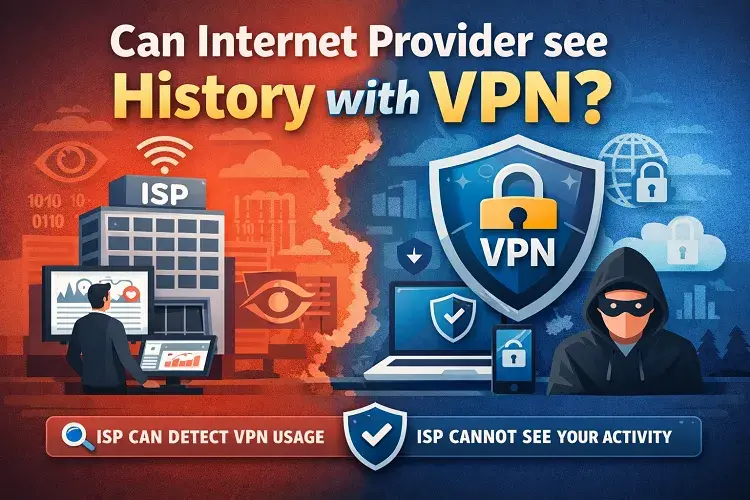
Every user on the internet asks this question every day, Can Internet Providers See Your History With VPN? When you connect to a quality VPN service, your ISP’s ability to monitor your browsing history becomes severely limited. The encryption provided by a VPN transforms your internet traffic into unreadable code before it ever reaches your ISP’s servers, making it technically impossible for them to see which websites you visit, what you search for, or what files you download. Think of a VPN as a secure tunnel that encapsulates all your internet communications. Your ISP can detect the existence of this tunnel and see that data is flowing through it, but they cannot see the actual contents—no matter how sophisticated their monitoring equipment is.
What ISPs Can Still See When You Use a VPN
While VPNs provide substantial privacy protection, it’s crucial to understand that they don’t make you completely invisible to your ISP. Several data points remain visible even when you’re connected to a VPN:
| ISP Can See | ISP Cannot See |
|---|---|
| That you’re connected to a VPN server | Websites you visit |
| The VPN server’s IP address | Search queries |
| Your VPN protocol (OpenVPN, WireGuard, etc.) | Files you download or upload |
| Connection timestamps and duration | Browsing history details |
| Amount of data transferred | Personal information entered online |
| General usage patterns | Streaming content or services used |
Your ISP knows when you connect and disconnect from the VPN, and they can observe the volume of data being transmitted. Some advanced ISPs use Deep Packet Inspection (DPI) technology to analyze encrypted traffic patterns and identify that a VPN is in use, though they still cannot decrypt the content.
The Encryption Magic: How VPNs Hide Your Activity
Understanding how VPN encryption works helps explain why ISPs remain blind to your browsing history. When you use a standard internet connection without a VPN, every request travels directly from your device through your ISP’s network to the destination website. Your ISP sits at this junction point and can see everything.
A VPN changes this process fundamentally. The VPN software on your device encrypts all your internet traffic using advanced encryption algorithms. This encrypted data is then sent to a VPN server operated by the VPN provider, not directly to the websites you want to visit. The VPN server receives your encrypted traffic, decrypts it, and forwards your request to the destination website. When the website responds, the VPN server encrypts that response and sends it back to you, where your device decrypts it.
Your ISP sees only the encrypted tunnel connecting your device to the VPN server’s IP address. The actual destination of your traffic remains hidden because the entire communication is encrypted. This means websites you visit don’t directly connect to your home IP address—instead, they see the VPN server’s IP address, protecting your real location and identity.
Major USA Internet Providers and Their Data Collection Practices
The landscape of data collection in America’s broadband market involves several major players that dominate the industry. According to recent market data, six major ISPs control approximately 98% of the mobile internet market in the United States.
Spectrum (Charter Communications) leads the market with 26.46% click share and serves approximately 20% of American households. Charter has been among the ISPs identified by the Federal Trade Commission for troubling data collection practices, including combining user data across product lines to serve targeted advertisements.
Comcast Xfinity maintains 19.6% click share and reaches 19% of American households. The FTC found that Comcast engages in extensive data collection, including tracking browsing history and app usage to categorize customers into sensitive demographic groups.
AT&T commands 22% of the household broadband market and 8.26% click share. Like other major carriers, AT&T collects comprehensive internet usage data and has been scrutinized for using this information to create detailed behavioral profiles of their customers.
Verizon holds 6% of the household market share and 5.95% click share. Verizon operates multiple subsidiary companies that use customer browsing data for targeted advertising purposes.
Cox Communications serves 5% of households with a 2.74% click share. Cox has publicly acknowledged that it engages in bandwidth throttling practices that can limit user speeds by up to 99% during peak usage times.
T-Mobile represents 5% of the household market while commanding 10.2% click share in certain segments.
The U.S. broadband services market generated $74.03 billion in revenue in 2024 and continues to expand, with projections reaching $113.8 billion by 2030 at a compound annual growth rate of 7.5%. Within this massive market, ISPs have positioned data collection as a significant revenue stream. Many compile anonymous browsing logs and sell them to marketing companies, while some providers have even attempted to make privacy an optional premium add-on feature.
How ISPs Collect Browsing History Without VPN Protection
To fully appreciate why a VPN is necessary, it helps to understand exactly what ISPs can see when you browse without one. Even if you’re using modern security protocols, ISPs still capture substantial information about your online behavior.
When you visit a website, your device first needs to translate the domain name into an IP address. This process relies on the Domain Name System (DNS), and DNS queries are rarely encrypted by default. Your ISP intercepts these DNS requests and logs which domains you’re attempting to access. This happens before you even reach the website you’re trying to visit.
For example, your ISP can see that you visited “bankofamerica.com” even if the website uses HTTPS encryption. While HTTPS prevents the ISP from seeing the specific pages you visit within that domain or the information you enter, it doesn’t hide the domain name itself. The ISP can create a detailed profile of your internet habits by tracking your DNS queries over time.
Additionally, ISPs can see your browsing activity even when you use incognito mode. Many users mistakenly believe that private browsing modes hide their activity from ISPs, but incognito mode only prevents your browser from storing history on your local device. Your ISP continues logging your activity as if you were browsing normally.
Deleting browser history also does not protect from ISP surveillance. Your ISP maintains independent records of your online activity on their servers, separate from your device’s browser history. Clearing your browser cache and cookies does nothing to prevent the ISP from tracking your past activities.
The Critical Danger: DNS Leaks That Expose Your History
Even with a VPN connected, a serious vulnerability called a DNS leak can completely undermine your privacy protection and expose your browsing history to your ISP.
A DNS leak occurs when your DNS requests bypass the VPN connection and are sent directly to your ISP’s DNS servers instead of the encrypted VPN tunnel. This happens when the VPN is misconfigured or when transparent proxies intercept DNS traffic. When a DNS leak occurs, your ISP can see your domain requests exactly as if you weren’t using a VPN at all.
The particularly dangerous aspect of DNS leaks is that you may not realize it’s happening. Your VPN app might show a connected status while your DNS queries are leaking unencrypted to your ISP. To protect yourself, you should regularly test for DNS leaks using tools like ipleak.net or dnsleaktest.com while connected to your VPN.
To prevent DNS leaks, ensure that your VPN provider routes all DNS requests through their encrypted servers. Some VPNs offer additional protection by using custom DNS servers that cannot be intercepted. WebRTC leaks present a similar vulnerability where browser features can expose your real IP address even when using a VPN, though modern VPNs often include built-in protections against this issue.
HTTPS Encryption Alone Is Not Sufficient
Many internet users believe that HTTPS encryption (indicated by the padlock icon in their browser address bar) provides complete protection from ISP monitoring. This is a dangerous misconception that leaves their browsing history vulnerable.
HTTPS encrypts the content traveling between your browser and a website’s servers, preventing the ISP from seeing what specific pages you access or what information you submit on those pages. However, HTTPS does absolutely nothing to hide the domain name of the website you’re visiting. Your ISP can still see that you visited “example.com,” “youtube.com,” or any other domain, because the domain name must be revealed during the initial connection process.
When aggregated over time, domain names alone reveal a detailed profile of your interests, habits, and potentially sensitive information. An ISP that observes you regularly visiting medical websites, political forums, or adult content sites can build extensive inferences about your personal life. HTTPS provides only partial privacy—not the comprehensive protection that a VPN delivers through complete encryption of your entire internet traffic.
Is Using a VPN Legal in the United States?
A common concern preventing people from using VPNs is whether they’re legal in America. The answer is definitely yes—VPNs are completely legal for US residents to use.
You won’t face legal consequences for using a VPN to increase your privacy online. The FBI itself recommends VPN use for enhanced security and privacy. Multiple VPN providers operate legally from within the United States, including Private Internet Access (PIA) and IPVanish.
However, using a VPN doesn’t grant you immunity from illegal activities. Any activity that would be illegal without a VPN remains illegal when using one. The legal status of VPNs is specifically about the tool itself, not about what you do while connected to one.
That said, it’s worth noting that while data privacy laws like the California Consumer Privacy Act (CCPA) provide some protections for personal information, there is no constitutional guarantee to anonymous internet browsing in America. This is precisely why relying on ISP goodwill for privacy protection is unrealistic—privacy-conscious users need to implement their own technical safeguards.
Choosing a VPN: The Critical Importance of No-Logs Policies
Simply connecting to any VPN doesn’t guarantee privacy. Your VPN provider becomes a new custodian of your browsing data, and you must trust that they won’t collect, log, or sell that information.
When evaluating a VPN service, a verified no-logs policy is non-negotiable. However, understanding what “no-logs” actually means is important because claims can be misleading. Every VPN provider must retain some customer data for billing and account purposes, so “no-logs” specifically refers to not logging your browsing activity and internet traffic.
Look for these essential characteristics when selecting a VPN:
Independent Audits: The best VPN providers submit their no-logs claims to independent auditors. NordVPN, for example, has been audited by PricewaterhouseCoopers AG Switzerland and Deloitte, confirming that they keep minimal logs beyond encrypted login credentials and billing information.
RAM-Only Servers: Some VPN providers like ExpressVPN use RAM-only servers, which means data is erased every time the server reboots. Even if law enforcement demanded the VPN provider surrender user data, there would be nothing stored on hard drives to provide.
Company Location: Your VPN provider will be subject to data-sharing laws based on their jurisdiction. Providers headquartered in countries that value data security—such as Switzerland or the British Virgin Islands—offer better privacy protections than those in countries with government data-sharing agreements.
Transparency Reports: Reputable VPN companies publish transparency reports detailing how many data requests they received from governments and how many they actually complied with. Most legitimate providers report complying with zero requests because they have no user data to provide.
Privacy Policy Details: Read the full privacy policy to understand exactly what minimal data they collect. Red flags include phrases like “certain logs,” “minimal logs for operational purposes,” or references to sharing data with “affiliate partners” (marketing companies).
Alternative Methods to Protect Your Browsing History
While VPNs are the most effective tool for comprehensive privacy protection, several alternative or supplementary methods can reduce ISP tracking:
Privacy-Focused Browsers: Browsers like Brave and Firefox offer built-in features that block trackers and enhance privacy. Brave particularly focuses on preventing ISP and third-party tracking.
Encrypted DNS Services: Services like Cloudflare (1.1.1.1) and OpenDNS encrypt your DNS queries, preventing your ISP from seeing which domains you access. This method provides some protection without a full VPN, though it’s less comprehensive.
Tor Browser: The Tor network encrypts your traffic and routes it through multiple relays, effectively hiding your identity and browsing from your ISP. However, Tor is limited to browser traffic only and significantly slows connection speeds. Additionally, ISPs can detect that you’re using Tor, which may raise concerns.
HTTPS Everywhere Extensions: Browser extensions that enforce HTTPS connections on all websites provide some additional privacy layer, though, as discussed earlier, HTTPS alone is insufficient for complete protection.
These alternative methods work best as supplementary measures alongside a VPN rather than as replacements for one.
Understanding ISP Bandwidth Throttling and Its Relationship to VPN Use
Many ISPs engage in bandwidth throttling, intentionally slowing internet speeds for certain types of activity or users. Throttling serves several purposes: managing network congestion during peak hours, enforcing data caps, or providing “priority” speeds for customers willing to pay premium prices.
Cox and Comcast have publicly acknowledged throttling user bandwidth by up to 99%, and field studies in 2018-2019 found major wireless carriers throttling a majority of the time, even when network traffic was light.
The legal status of throttling changed dramatically on January 2, 2025, when the Sixth Circuit Court of Appeals struck down FCC net neutrality rules, making bandwidth throttling legal at the federal level as long as ISPs provide adequate disclosure.
Using a VPN can potentially help bypass throttling because the ISP cannot identify the specific type of activity being performed inside the encrypted VPN tunnel. However, ISPs can still detect that you’re using a VPN and may implement throttling on all VPN traffic as a blanket policy. The relationship between VPN use and throttling varies significantly depending on your specific ISP’s policies.
FAQ: Common Questions About ISP Monitoring and VPN Privacy
1. Can my ISP see me using a VPN?
Usually yes. Your ISP can identify VPN usage by recognizing known VPN server IP addresses or by detecting the unique traffic patterns of encrypted VPN connections through Deep Packet Inspection. However, they cannot see what you’re doing inside the VPN.
2. Will a VPN prevent my ISP from throttling my connection?
Potentially, because your ISP cannot see what specific activities you’re performing inside the encrypted VPN tunnel. However, some ISPs throttle all VPN traffic regardless of its contents. VPN effectiveness for preventing throttling depends on your specific ISP’s policies.
3. Can my VPN provider see my browsing history?
Technically, yes—the VPN server decrypts your traffic to forward it to destination websites. However, reputable VPN providers with verified no-logs policies do not record or store this information. Choose providers with independent audits confirming their no-logs claims.
4. What’s the difference between clearing my browser history and hiding from my ISP?
Clearing browser history only removes records from your device’s local storage. Your ISP maintains separate records of your online activity on their servers, completely independent of your device. ISPs can see your deleted history in their logs.
5. Does using incognito mode hide my activity from my ISP?
No. Incognito mode only prevents your browser from saving history on your local device. Your ISP continues monitoring your activity exactly as it does in normal browsing mode.
6. Is a VPN my only option for privacy from ISPs?
VPNs provide the most comprehensive protection, but alternative methods exist. Using HTTPS websites, privacy-focused browsers, encrypted DNS services, and Tor provides varying levels of protection. Most privacy-conscious users employ VPNs as their primary tool while using other methods as supplementary measures.
Conclusion: Taking Control of Your Digital Privacy
The reality of internet privacy in 2026 is stark: without deliberate action, your ISP captures and monetizes your complete browsing history. Major providers like Spectrum, Comcast Xfinity, AT&T, Verizon, Cox, and T-Mobile collectively serve the vast majority of American internet users, and the FTC has documented their extensive data collection and sharing practices.
Using a VPN is the most effective tool available to American internet users for reclaiming privacy from ISP surveillance. When properly configured and combined with a verified no-logs policy from your VPN provider, a VPN makes it technically impossible for your ISP to see your browsing history, search queries, or downloaded files.
However, VPN protection is not automatic or complete. You must actively implement it, verify that DNS leaks aren’t occurring, and select a VPN provider whose privacy policies you can trust. Supplementary privacy measures like encrypted DNS services and privacy-focused browsers provide additional layers of protection.
Your internet privacy is not guaranteed by law or ISP goodwill—it’s something you must actively protect through technical tools and informed choices. In an era where your browsing history has become a tradeable commodity for ISPs and their marketing partners, a quality VPN is no longer a luxury but a practical necessity for anyone who values digital privacy.